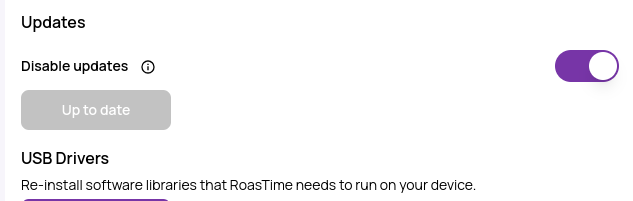
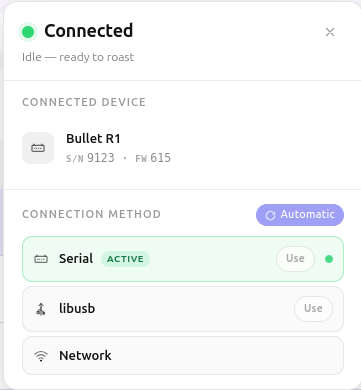
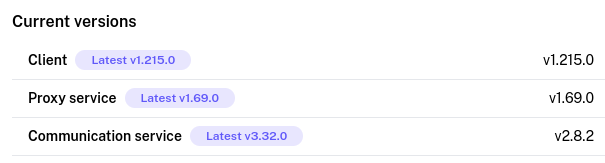
I am having the exact same problem with the roaster showing up in lsusb but roastime show it as offline. I have also been through 10 different instances of shutting down the machine, shutting down the app, etc and each and every time it shows applying updates. I tried to put all the relevant info below.
lsusb | grep Ail
Bus 003 Device 008: ID 0483:a27e STMicroelectronics Aillio LTD- Bullet R1 ROASTER FS
cat /etc/udev/rules.d/99-aillio-roaster.rules
# Aillio roaster udev rules
#
# Installed by https://public.roast.world/linux-udev-fix.sh
#
# 1. Keep ModemManager off the port.
#
# Aillio roasters enumerate as USB CDC ACM devices, which ModemManager treats as
# modem candidates by default: it opens the port and writes AT commands to it. A
# tty is not exclusive and every byte goes to exactly one reader, so its probing
# takes replies meant for RoasTime, and a port reset makes in-flight writes fail
# with EIO. The property is set on the USB device and on the tty, because
# ModemManager consults both.
#
# 2. Let the desktop user open the device.
#
# uaccess hands the device to whoever is logged in at the seat, via systemd-logind:
# no group membership, no logout. The group rule below it, if present, covers
# headless and non-systemd setups where uaccess does not apply.
#
# Verify:
#     udevadm info -q property -n /dev/ttyACM0 | grep ID_MM

SUBSYSTEM=="usb", ATTRS{idVendor}=="0483", ATTRS{idProduct}=="5741", ENV{ID_MM_DEVICE_IGNORE}="1"
SUBSYSTEM=="tty", ATTRS{idVendor}=="0483", ATTRS{idProduct}=="5741", ENV{ID_MM_DEVICE_IGNORE}="1"

SUBSYSTEM=="usb", ATTRS{idVendor}=="0483", ATTRS{idProduct}=="a27e", ENV{ID_MM_DEVICE_IGNORE}="1"
SUBSYSTEM=="tty", ATTRS{idVendor}=="0483", ATTRS{idProduct}=="a27e", ENV{ID_MM_DEVICE_IGNORE}="1"

SUBSYSTEM=="usb", ATTRS{idVendor}=="0483", ATTRS{idProduct}=="a27f", ENV{ID_MM_DEVICE_IGNORE}="1"
SUBSYSTEM=="tty", ATTRS{idVendor}=="0483", ATTRS{idProduct}=="a27f", ENV{ID_MM_DEVICE_IGNORE}="1"

SUBSYSTEM=="usb", ATTRS{idVendor}=="0483", ATTRS{idProduct}=="a4cd", ENV{ID_MM_DEVICE_IGNORE}="1"
SUBSYSTEM=="tty", ATTRS{idVendor}=="0483", ATTRS{idProduct}=="a4cd", ENV{ID_MM_DEVICE_IGNORE}="1"

# Grant the logged-in desktop user access to every Aillio device
SUBSYSTEM=="usb", ATTRS{idVendor}=="0483", TAG+="uaccess"
SUBSYSTEM=="tty", ATTRS{idVendor}=="0483", TAG+="uaccess"

# Fallback for sessions uaccess does not cover (headless, non-systemd).
# 0660 rather than 0666: the group is the grant, so there is no reason to
# open the roaster to every account on the machine.
SUBSYSTEM=="usb", ATTRS{idVendor}=="0483", MODE="0660", GROUP="uucp"
SUBSYSTEM=="tty", ATTRS{idVendor}=="0483", MODE="0660", GROUP="uucp"
groups
roastuser adm uucp dialout cdrom sudo dip video plugdev render lpadmin lxd sambashare libvirt ollama docker
lsb_release -a
No LSB modules are available.
Distributor ID:	Ubuntu
Description:	Ubuntu 24.04.5 LTS
Release:	24.04
Codename:	noble
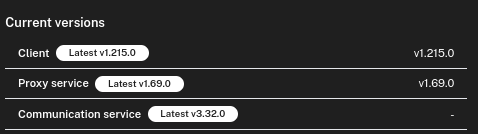
./Applications/RoasTime-4.6.16_66c662f18dc8953d7518294bc0c442bc.AppImage
Warning: Ignoring XDG_SESSION_TYPE=wayland on Gnome. Use QT_QPA_PLATFORM=wayland to run on Wayland anyway.
electron-simple-updater: Found version 4.14.3 at https://releases.roast.world/roastime-main/v4.13.6/RoasTime-4.13.6.AppImage
electron-simple-updater: Downloading updates from https://releases.roast.world/roastime-main/v4.13.6/RoasTime-4.13.6.AppImage
electron-simple-updater: New version 4.14.3 has been downloaded