In version 2.0,8 you can do that now.
A couple of notes from tonight:
-
When you run back to back batches, using f1 after cooling, if you don’t first save your roast profile data, it gets deleted instead of saved. It used to save automatically in this scenario.
-
When using the playback feature, if you change indices from C to F mid roast, your live roast curve will update but the underlying shadow curve will stay in C.
1 Like
Did 4 roasts with 2.0.8beta, in two them the graphs just stopped building up after a few minutes. Program was still responsive, but measurements just stopped. Happy with the new yellowing / fc / sc buttons though 
1 Like
Thanks for the feedback everyone, our developers are receiving it.
While the Playback Mode is much better in 2.0.8, it could still benefit from some refinements. One thing I’d suggest is working on the horizontal (time) scaling of the Control Settings… They don’t seem to quite line up with the temperature graphs, especially when the profile temp lines ends before the right hand edge of the graph. The control settings seem to always be scaled across the whole graph, while the temperature lines might not be. Further, if you need to roast longer than the profile you are following, the Control Settings cease updating, and don’t shift in sync with the graph shrinking as the plot lines reach the right hand axis. (I hope this makes sense!) Also, if you roast longer, the time markings on the bottom of the graph stop updating.
I find myself trying to line up where the graph lines are drawing and the equivalent point in the Control Settings. Besides having these all scale in sync, a traveling “cursor” indicating where one is precisely on the Control Settings would be great.
I just finished my second seasoning roast on my new Bullet. Before I received the Bullet, I tried to learn as much as I could about RoasTime. I found YouTube videos and I reviewed them. I am using RT 2.0.8 beta. It doesn’t look anything like those YouTube videos. After I finished these seasoning roasts, I was prompted to enter the details about the bean. I did so and saved it. When I reopened the RoasTime program there is nothing there about prior roasts. It says I have no saved roasts. If I go to Roast.World.com all of the roasts are there.
Question #1: How do I get my prior roasts to show up on RoasTime 2.0.8?
Next. On the YouTube videos there are instructions on setting up roast profiles with a profile program. I cannot find that anywhere in RoasTime 2.0.8.
Question #2: Is there a program to set up roast profiles and where is it?
On prior RT, there appears to be setup customization liking showing X and Y lines on the graph. I cannot find anything like this on 2.0.8
Question #3: Is there a place to customize the setup like prior versions?
Question #4: Is there a video or manual somewhere on how to use 2.0.8?
Sorry for these questions. I am new at this.
2 Likes
if possible,could you add the roast development can be predicted when we are roasting.
That will help us to adjust the power high or low immediately as well as develop fine roasting.
1 Like
I haven’t encountered any problems with the Beta, this is the first version of RoasTime I’ve used, so still getting used to it.
A feature I’d appreciate is the ability to print labels with the Bean name, roast date, roast level and a comment line on a small label that I could slip into my bean jars or tape to a coffee bag. Probably a cut piece of paper about 3" or so wide by 1/2" to 3/4" tall, being able to print multiple labels on a single page.
I guess this would also mean that I’d like to see a roast level field in RoasTime that I could populate with City / City+ / Full City or Light, Medium, Dark, or what have you.
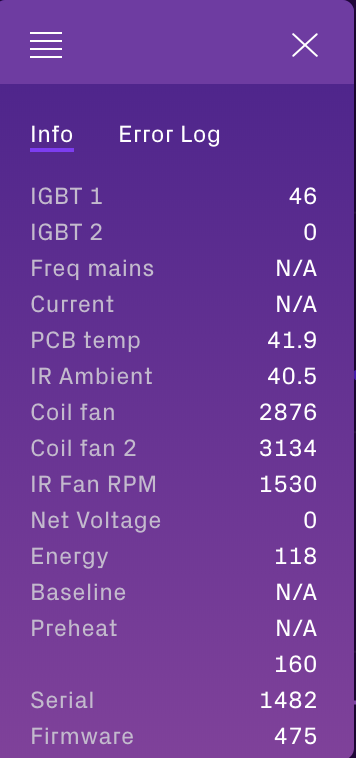
Net Voltage reads 0, however, Energy fluctuates between 106 and 140, keeping stable at 118. Is Energy the new Net Voltage? I haven’t found any info about Energy…
Yes, the energy label should be the net voltage. Will be updated in the newest release.
well but the layout was better v 1…
color disturb somehow … ,liked older version much better, the only advantage now I can use my mac hate windows
Issues after RT Beta upgrade
After using RT to install current version (a beta) RT won’t respond. It shows my Bullet ready to roast, I was able to select a profile to run but that was it. Update: had to unplug the Bullet and reboot before it was recognized even though the beta was installed yesterday before I connected the Bullet.
Why do we need to share with the rest of the world what beans I am using? I feel this can lead to a bit of IP concerns.
Uninstalled 32 bit, installed 64 bit. Roastime opens and shows a blank screen. Literally all white. Can’t do anything.
Sharing is caring
With that said we are working on a way to opt in for making some parts private. It goes both ways right? you can learn from others and they can learn from you.
Try to uninstall and then you can try to remove these folders:
C:\Users\YourUserName\AppData\Local\aillio-ts
C:\Users\YourUserName\AppData\Roaming\RoasTime
You might need to enable “hidden items” go to the View tab or View options.
1 Like
When I installed RoasTime based on the instructions here I ended up checking the github repository for other releases, looking for something newer. I found Beta 2.2.0 and have been using that since I setup my roaster last night.
Is there a feedback thread for that version? Can I give feature requests (like you probably don’t have a parking lot of prioritized features already on your plate )
Things like recording drum temp in addition to IBTS and traditional bean temp, and recording the preheat values (drum temp and bean temp) on the graph that is stored.
Also I have just general questions about the software too.
Dear jacob~thank you so much ,I already solve problem