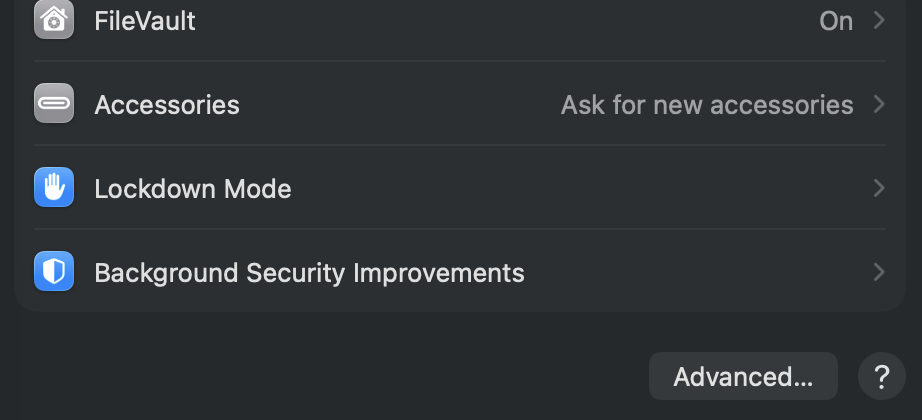
MacOS. Cable tested and works. Deleted dependencies. Any help appreciated.
This doesn’t detected any devices: “ioreg -p IOUSB -l -w 0 | grep Roast”. I’ve checked and reset my settings so that accessories are allowed.
MacOS. Cable tested and works. Deleted dependencies. Any help appreciated.
This doesn’t detected any devices: “ioreg -p IOUSB -l -w 0 | grep Roast”. I’ve checked and reset my settings so that accessories are allowed.
Hey,
You probably know this, but just to make sure, ioreg -p IOUSB -l -w 0 | grep Roast would probably not return anything even if it were there since the name is typically STMicroelectronics Aillio LTD- Bullet R1 ROASTER FS and grep is case sensitive, so you would want to ioreg -p IOUSB -l -w 0 | grep ROAST.
Is this a new Mac (m-series)? Or is this a new issue on an Intel distribution that was working before?
Thanks!
heya - thanks for the reply. I wasn’t aware of the official name so thanks for telling me. I made the grep case insensitive (“grep -i”) and got some hits (should’ve thought of making it case-insensitive by defaut!):
+-o Aillio LTD- Bullet R1 ROASTER FS@00100000  <class IOUSBHostDevice, id 0x10000fdc2, !registered, !matched, inactive, busy 2 (2729 ms), retain 24>
|   {
|     "sessionID" = 1021205119187
|     "USBSpeed" = 1
|     "UsbLinkSpeed" = 12000000
|     "idProduct" = 41598
|     "iManufacturer" = 1
|     "bDeviceClass" = 0
|     "IOPowerManagement" = {"DesiredPowerState"=2,"PowerOverrideOn"=Yes,"CapabilityFlags"=0,"MaxPowerState"=2,"DevicePowerState"=2,"DriverPowerState"=0,"CurrentPowerState"=0}
|     "bcdDevice" = 512
|     "bMaxPacketSize0" = 64
|     "iProduct" = 2
|     "iSerialNumber" = 3
|     "bNumConfigurations" = 1
|     "UsbDeviceSignature" = <83047ea200023030303030303030303230300000000202010a0000>
|     "USB Product Name" = "Aillio LTD_ Bullet R1 ROASTER F"
|     "locationID" = 1048576
|     "bDeviceSubClass" = 0
|     "bcdUSB" = 512
|     "kUSBSerialNumberString" = "000000000200"
|     "USB Address" = 1
|     "IOCFPlugInTypes" = {"9dc7b780-9ec0-11d4-a54f-000a27052861"="IOUSBHostFamily.kext/Contents/PlugIns/IOUSBLib.bundle"}
|     "kUSBCurrentConfiguration" = 1
|     "bDeviceProtocol" = 0
|     "USBPortType" = 5
|     "IOServiceDEXTEntitlements" = (("com.apple.developer.driverkit.transport.usb"))
|     "USB Vendor Name" = "STMicroelectronics"
|     "Device Speed" = 1
|     "idVendor" = 1155
|     "kUSBProductString" = "Aillio LTD- Bullet R1 ROASTER FS"
|     "USB Serial Number" = "000000000200"
|     "kUSBAddress" = 1
|     "kUSBVendorString" = "STMicroelectronics"
|   }
|
+-o Aillio LTD- Bullet R1 ROASTER FS@00100000  <class IOUSBHostDevice, id 0x10000fdd4, !registered, !matched, inactive, busy 2 (1734 ms), retain 25>
    {
      "sessionID" = 1021228996323
      "USBSpeed" = 1
      "UsbLinkSpeed" = 12000000
      "idProduct" = 41598
      "iManufacturer" = 1
      "bDeviceClass" = 0
      "IOPowerManagement" = {"DesiredPowerState"=2,"PowerOverrideOn"=Yes,"CapabilityFlags"=0,"MaxPowerState"=2,"DevicePowerState"=2,"DriverPowerState"=0,"CurrentPowerState"=0}
      "bcdDevice" = 512
      "bMaxPacketSize0" = 64
      "iProduct" = 2
      "iSerialNumber" = 3
      "bNumConfigurations" = 1
      "UsbDeviceSignature" = <83047ea200023030303030303030303230300000000202010a0000>
      "USB Product Name" = "Aillio LTD_ Bullet R1 ROASTER F"
      "locationID" = 1048576
      "bDeviceSubClass" = 0
      "bcdUSB" = 512
      "kUSBSerialNumberString" = "000000000200"
      "USB Address" = 1
      "IOCFPlugInTypes" = {"9dc7b780-9ec0-11d4-a54f-000a27052861"="IOUSBHostFamily.kext/Contents/PlugIns/IOUSBLib.bundle"}
      "kUSBCurrentConfiguration" = 1
      "bDeviceProtocol" = 0
      "USBPortType" = 5
      "IOServiceDEXTEntitlements" = (("com.apple.developer.driverkit.transport.usb"))
      "USB Vendor Name" = "STMicroelectronics"
      "Device Speed" = 1
      "idVendor" = 1155
      "kUSBProductString" = "Aillio LTD- Bullet R1 ROASTER FS"
      "USB Serial Number" = "000000000200"
      "kUSBAddress" = 1
      "kUSBVendorString" = "STMicroelectronics"
    }
It’s an m-series running an m3 chip. It was working before but would stop once in a while after an update. I remember fixing such issues after redownloading ARM releases from the website (usually the same build as mine would auto-update anyway).
In ~/Library/Application Support/RoasTime/deps you should be able to find a file roastime-comms.... Try deleting that and restarting RT. What version of comms does it say is running right now?
My apologies for the late reply—I was traveling, just got back, and tried to roast a new batch. Deleting ~/Library/Application Support/RoasTime/deps/roastime-comms-mac-arm64 perhaps had no effect, unfortunately, but resetting permissions for accessories def seemed to do the trick. I played with the settings and plugged in the roaster until it was detected by the OS. Even so, RoasTime didn’t detect the roaster until I rebooted the computer.
My suggestion for Aillio is to do some work around this, as it’s quite a common issue. Technically, they can be agnostic, as it’s probably an OS issue, but it’s a recurring, common problem for RoasTime users who are using a connection required by Aillio (USB) instead of other, technically inferior options such as Bluetooth or Wi‑Fi.
An update: I did two successful roasts but at the end of the second one, the connection was lost and I had to do the third roast manually. I rebooted etc. but to no avail.
This sucks 
@kashifnoorani When the connection is lost, does it still show as connected at the OS-level? Do you see any logs when running this command:
log stream --predicate "eventMessage CONTAINS[c] 'USB'" --level debug
I am wondering if the USB is being lost and immediately reconnected, but there is some issue with reclaiming it in RT.